
A practical “from prototype to production” playground: ship real agentic workflows, keep the barrier to entry low, and only “level up” infrastructure when the workflow is proven.
That’s exactly the spirit of the NVIDIA ecosystem right now for agentic development:
- NVIDIA’s building blocks for agentic AI are explicitly framed as NeMo (lifecycle management), NIM (deployment/inference microservices), and Blueprints (reference workflows you can customize).
- You can start with free, hosted NIM APIs for prototyping (no GPU purchase required), then move to downloadable/self-hosted NIM for development and testing, and only later worry about production licensing and dedicated infrastructure.
- On the hardware side, Supermicro JumpStart lets you test on real “serious” systems (including RTX PRO 6000 Blackwell Server Edition options) without shipping gear to your office—ideal for a “prove it first” agency-style POC.
The high-level workflow for an NVIDIA-native agentic app
The cleanest “NVIDIA-only agentic framework” interpretation is:
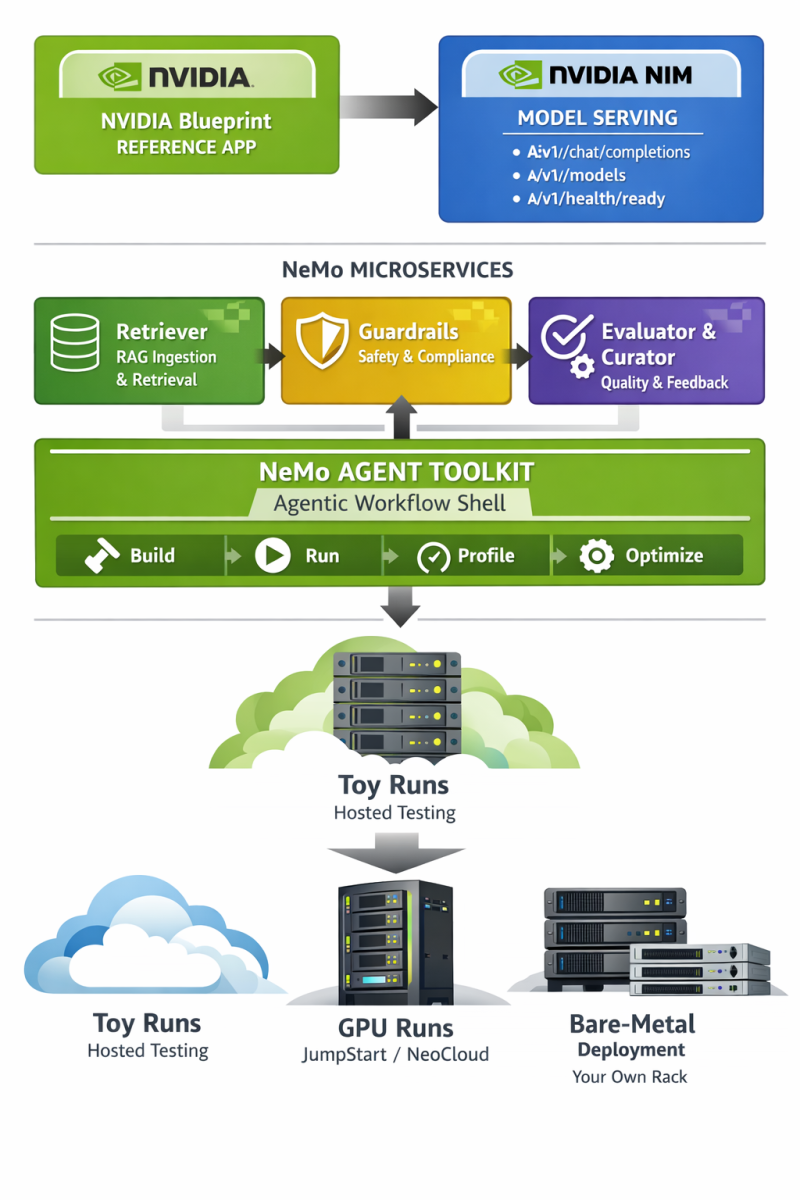
- Start from an NVIDIA Blueprint (reference app) so you inherit a working architecture and deployable scaffolding.
- Use NVIDIA NIM as your model-serving layer (hosted APIs first, then self-host as needed). NVIDIA documents OpenAI-compatible endpoints like
/v1/chat/completions,/v1/models, and/v1/health/ready. - Use NeMo microservices for “agent plumbing”:
- Retriever for RAG-grade ingestion and retrieval (and to keep your agent grounded in your source corpus).
- Guardrails for safety constraints (topic control, PII detection, jailbreak resistance, grounding checks).
- Evaluator/Curator/etc. when you want measurable quality gates and a feedback loop for continuous improvement across the agent lifecycle.
- Use NeMo Agent Toolkit as the “agentic workflow shell” (build/run/profile/optimize and inspect multi-step agent behavior).
- Test in layers, graduating from “toy” runs (hosted) → “real GPU runs” (JumpStart / NeoCloud) → “repeatable bare-metal deployment” (your own rack). This mirrors DoggyDish’s “scale your app” narrative.
A concrete DoggyDish-style example app (what you’d demo to an investor):
Let’s build a “Deep Research Agent” for niche domains — an AI researcher that ingests PDFs/docs, retrieves citations, and produces investor-ready briefs (market scans, technical feasibility, competitor comparisons). This is deliberately aligned with NVIDIA’s AI‑Q Blueprint, which is designed to build a custom researcher that connects to your data sources and synthesizes deep source material quickly.
A low-cost POC path using free NVIDIA tooling
This section is written as a “you can do this in a weekend” runway—then you hand it to a dev agency to harden and pitch.
Free-first compute choices
Option A: Prototype on NVIDIA-hosted NIM APIs (recommended start)
NVIDIA advertises free access to NIM API endpoints for “unlimited prototyping” for members of the NVIDIA Developer Program, backed by DGX Cloud.
Option B: Prototype locally or on a NeoCloud using self-hosted NIM (still POC-grade)
NVIDIA’s Developer Program access also includes downloadable NIM microservices for development/testing/research, and NVIDIA’s FAQ describes self-hosted usage for those purposes (including an experimentation cap described as “up to 16 GPUs”).
“Get your hands dirty” dev environment
For the scrappy POC, you want a reproducible environment on laptop → cloud → workstation.
NVIDIA AI Workbench is explicitly positioned as a way to start locally and migrate projects to any GPU-enabled environment, and NVIDIA’s docs say it’s free and installs quickly across Windows/macOS/Ubuntu.
You’ll also want the NGC catalog because it provides GPU-optimized containers, pretrained models, and related assets “tested and ready to run” on supported NVIDIA GPUs across on‑prem/cloud/edge.
Minimal POC architecture
Keep it intentionally small:
- One NIM endpoint (hosted or self-hosted) for the LLM.
- NeMo Guardrails (local Docker Compose) to keep outputs safe and predictable.
- NeMo Agent Toolkit to orchestrate a multi-step workflow and expose intermediate steps (so your demo is explainable to investors).
- Optional: NeMo Retriever if your POC needs heavy PDF ingestion and RAG grounding.
This is consistent with NVIDIA describing NeMo as a modular suite for the agent lifecycle—including evaluation, policy enforcement, and observability.
POC setup steps that map cleanly to NVIDIA docs
Install + run the agent shell (NeMo Agent Toolkit). NVIDIA’s docs show install via pip and describe a built-in API server + web UI that helps you interact with workflows and see intermediate steps.
Deploy guardrails locally for “safety first” demos. NVIDIA’s microservices docs describe Docker Compose configurations (default and quickstart) for Guardrails experimentation, and they also document Docker Compose as a local development/testing option.
Self-host a NIM when you’re ready to move off hosted endpoints. NVIDIA’s NIM docs define the typical endpoints you’ll test (/v1/health/ready, /v1/models, /v1/chat/completions).
When you deploy NeMo microservices components (or pull NIM images), you’ll typically need:
- An account/key for NGC registry access, and
- An NVIDIA API key for model endpoints (depending on the specific component).
A practical note: if your POC uses docker run with multi-GPU or large models, NVIDIA recommends using a shared memory flag like --shm-size=16GB for multi-GPU setups in the NIM configuration guidance.
A tiny “agent loop” you can demo
Your investor-facing demo should show tool use + reasoning + grounded output. A common pattern (that fits AI‑Q and NeMo tooling) is:
- Ingest: accept PDFs and notes (or point at a folder)
- Retrieve: pull relevant snippets
- Reason: draft a structured answer
- Verify: apply guardrails and “must cite sources” rules
- Output: produce a formatted report
AI‑Q is explicitly positioned as a reference implementation of this “AI researcher” concept, and NVIDIA’s AI‑Q content describes a loop that plans/refines and produces reports informed by source data.
SCALING YOUR AGENT
Step-up compute with Supermicro JumpStart and RTX PRO 6000
Once the workflow works on hosted APIs, the biggest credibility boost is: run the exact same POC on real, modern hardware.
Supermicro’s JumpStart program is built for this: it provides free access to high-end demo systems via the browser and offers remote sessions (SSH/VNC/web IPMI) so you can validate and benchmark your own workloads.
The NVIDIA-specific JumpStart page explicitly calls out availability of RTX PRO 6000 Blackwell Server Edition GPU options for testing/validation.
Why RTX PRO 6000 is a smart “serious POC” GPU
For an agency POC meant to graduate to scale-out, RTX PRO 6000 Blackwell Server Edition has a few investor-friendly properties that are easy to explain:
- NVIDIA’s product materials describe it as a data-center GPU built on Blackwell with 96GB GDDR7 and specifically call out workloads including “agentic AI.”
- The datasheet lists 96GB GDDR7 with ECC, ~1597 GB/s memory bandwidth, up to 600W, and support for multi-instance GPU (MIG)—useful when you want to partition one GPU into multiple isolated “agent workers” for higher utilization.
JumpStart constraints you must design around
To keep the POC clean (and to avoid wasting your JumpStart window), design your POC with the program’s constraints explicitly in mind:
- Sessions are limited (one VNC, one SSH, one IPMI per server).
- Demo servers are reset after use; Supermicro describes manual secure erase + BIOS/firmware reflash + OS reinstall after demos.
- Sensitive data is explicitly prohibited on demo systems; use anonymized or synthetic corpora.
The JumpStart “hardware validation sprint” in practice
A realistic (and investor-legible) validation sprint:
- Day one: deploy the same containers you used locally (agent orchestration + guardrails + NIM endpoint), confirm basic correctness.
- Day two: benchmark:
- requests/sec at a fixed latency SLO
- retrieval latency vs. corpus size
- multi-agent concurrency
- Day three: “failure mode” testing:
- kill/restart a container
- enforce guardrails regressions
- measure cold-start behavior and caching
This is exactly the kind of “proof it runs on real servers” story that turns a demo into a fundable plan. The JumpStart program is explicitly positioned for workload validation and benchmarking.
Testing that scales from laptop to rack
A POC becomes investor-grade when you can show repeatability and measurement, not just “it worked once.”
Functional and contract tests
At minimum, your CI should assert:
- The inference service responds to health and model discovery endpoints (
/v1/health/ready,/v1/models). - The chat endpoint accepts OpenAI-compatible request bodies (
/v1/chat/completions).
If you’re using NeMo microservices’ NIM Proxy, NVIDIA’s docs also show chat completions routing through that proxy in a way that still uses /v1/chat/completions, including example Python usage.
RAG grounding and ingestion tests
If your agent is “research-grade,” retrieval quality is your product.
NVIDIA’s NeMo Retriever is explicitly positioned as a core component of both the RAG Blueprint and AI‑Q, and NVIDIA’s AI‑Q materials describe accelerated ingestion/indexing for multimodal enterprise data.
NVIDIA marketing for AI‑Q also includes performance claims (e.g., faster token generation and faster ingestion); if you use these in a pitch deck, treat them as “vendor-stated” and replicate the measurements on your own corpora during the JumpStart sprint.
Safety and compliance tests
Guardrails aren’t just “feel good”—they reduce demo risk and make your POC credible in enterprise settings.
NVIDIA explicitly describes NeMo Guardrails as an orchestration layer for safety controls including topic control, PII detection, grounding, and jailbreak prevention.
For POCs, Docker Compose is a documented deployment mode for lightweight experimentation and testing.
Performance and cost profiling
If you can’t answer “what does one query cost on our target hardware?” you don’t have an investor-ready plan yet.
NeMo Agent Toolkit is described as helping profile and optimize agent workflows by exposing bottlenecks and costs and improving reliability at scale, which aligns directly with investor questions about unit economics.
On the infrastructure side, if you plan to multiplex multiple users/agents per GPU, RTX PRO 6000’s MIG support (up to multiple instances) can be part of the utilization story—again, something you can validate during JumpStart.
From POC to investor-ready scale-out on your own bare metal
Once the workflow is validated on hosted endpoints + JumpStart, the scale-out narrative becomes straightforward: buy or lease the exact shape of compute you already proved.
What “production-ready” means in NVIDIA terms
NVIDIA draws a clear line:
- Developer Program access: prototyping/research/development/testing (not positioned as production), with downloadable NIM access for those purposes.
- Production deployments: NVIDIA’s own docs state you’ll need NVIDIA AI Enterprise licensing once you move to production; the “Run NIM Anywhere” documentation includes a published starting price point (noting this can change by partner/channel).
This matters for investor conversations because it forces a clean plan:
- POC is low-cost (free tiers + JumpStart).
- Production has an explicit licensing and support model.
Why Supermicro is a natural next step after JumpStart
Supermicro’s RTX PRO 6000 messaging emphasizes multi-GPU server configurations and pairing with NVIDIA enterprise software stacks, and the company highlights a broad set of optimized systems (including multi-GPU form factors).
For “how do we scale?” storytelling, it helps to point to recognizable build-out units:
- 2‑GPU, 4‑GPU, and 8‑GPU server options are enumerated in Supermicro’s own RTX PRO 6000 RAG solution brief table (useful as example archetypes, even if your target workload isn’t public sector).
- Supermicro also states you can use up to eight RTX PRO 6000 GPUs in a server (a clean, modular scaling unit: add a node, add throughput).
What the dev agency brings to make it “fundable”
A development agency can take your JumpStart-validated POC and make it investor-grade by delivering:
- A reproducible deployment artifact (containers + config + environments), drawing directly from NVIDIA’s blueprint approach (reference code + Helm chart for deployment is part of NVIDIA’s blueprint story).
- A measured test suite: correctness + grounding + safety + load.
- A scaling model tied to real hardware:
- “1 node” baseline (then 2, 4, 8 nodes)
- concurrency targets (agents per GPU) using MIG partitioning when appropriate.
- A clear path for workloads that need Kubernetes: NeMo microservices are described in the NGC catalog as supporting modular AI workflow deployment across on‑prem or cloud Kubernetes environments.
- A “developer-to-deployment” workflow story: AI Workbench is designed to move projects from local RTX systems to cloud/data center environments.
If you structure the article around this progression—free prototype → JumpStart validation → repeatable bare-metal scale-out—you end up with exactly what you described: a POC that feels low-cost and builder-friendly, but also reads like an investor-ready systems plan backed by NVIDIA’s agentic stack and Supermicro’s hardware onramp.